
Auto-add a free gift with purchase when the cart hits a spend goal
Auto-adding a free gift with purchase isn't something Shopify's native Buy X Get Y does today, customers have to notice the offer and add it to their cart by hand. Stackable adds and removes it automatically, so the gift appears and disappears with the cart total.
Merchants on the Shopify forums ask...
“How do I automatically add a free gift once the cart reaches a spend threshold, without a third-party workaround? Native Buy X Get Y exists, but it never adds the gift itself, the customer has to find it and add it manually, and most don't.”
A gift-with-purchase promotion only works as an incentive if the customer actually sees it happen. When the gift requires a manual add, most shoppers never notice the offer, and the ones who do have to leave checkout, find the gift product, and add it themselves, exactly where cart abandonment happens.
How Stackable solves it
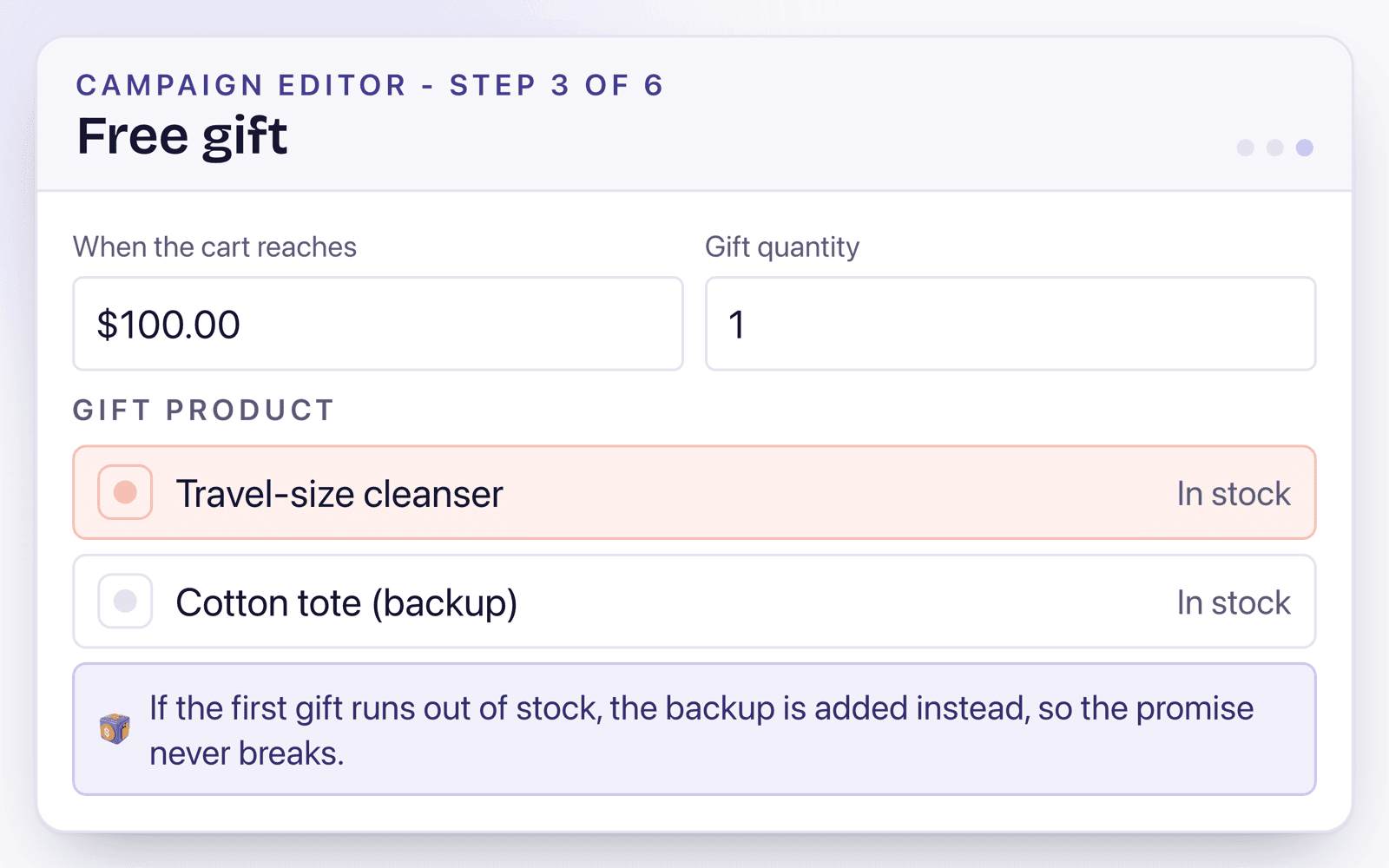
Set the spend threshold and gift product
Pick any product as the gift and the cart-value trigger that unlocks it.
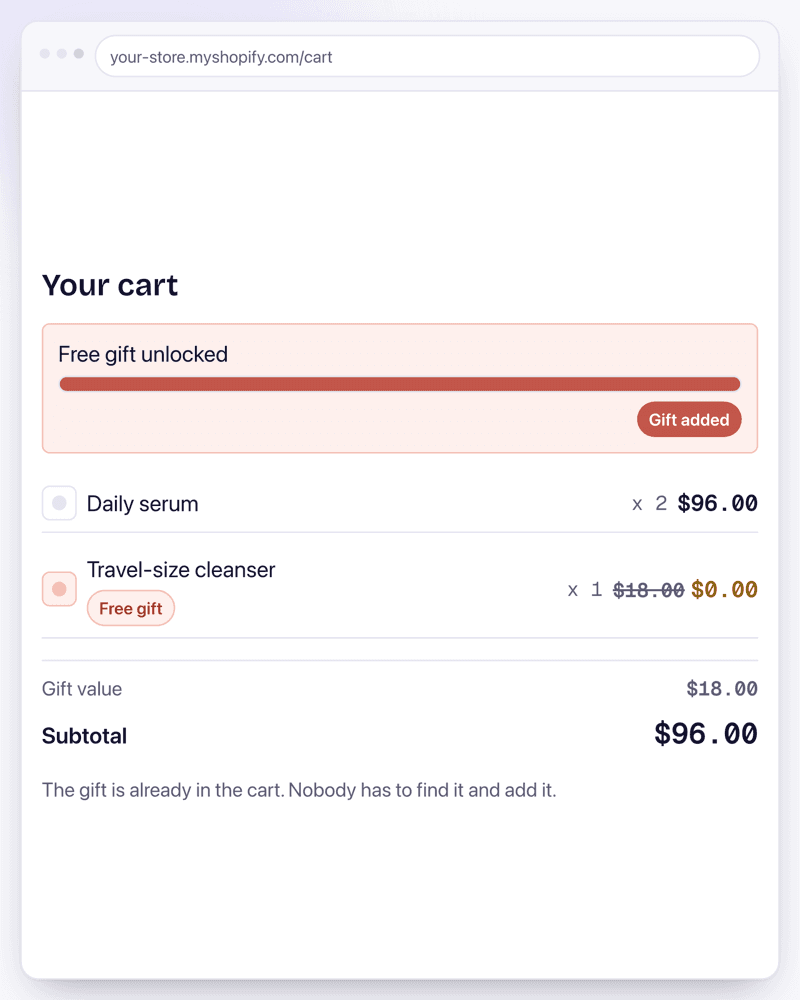
The gift adds itself automatically
Once the cart crosses the threshold, the gift line item appears at $0, no customer action required.
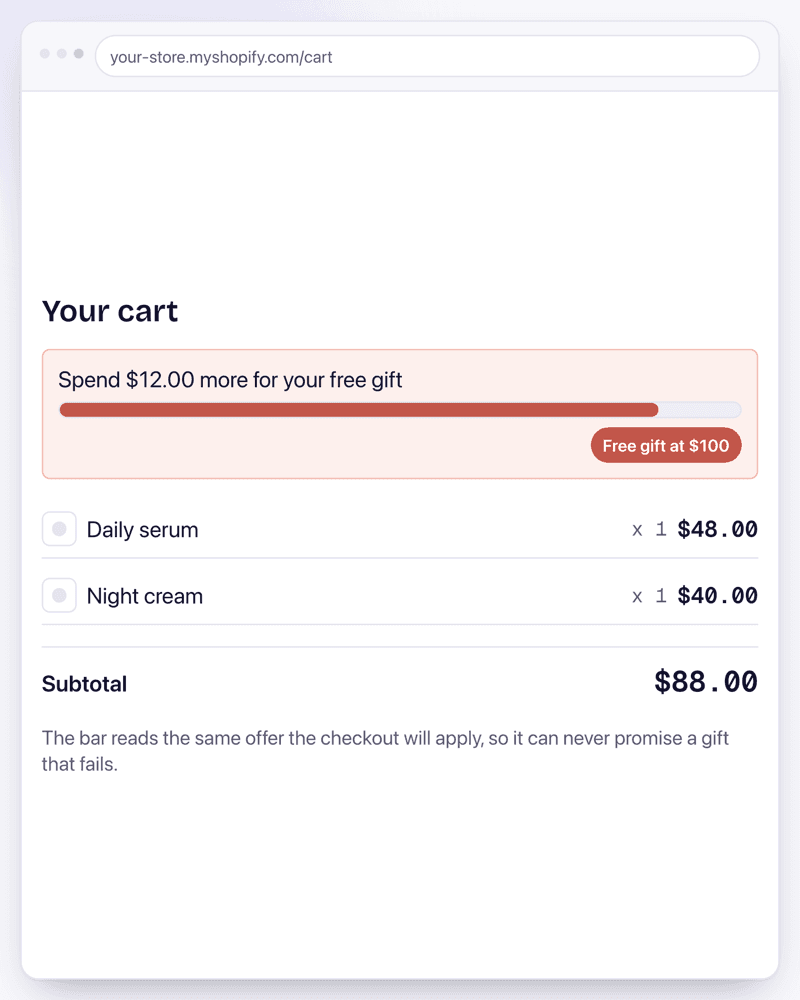
It is removed automatically too
If the cart drops back under the threshold, the gift is removed the same way, so carts never keep a gift they no longer qualify for.
Use it like this
A fashion brand wants every order over $75 to include a free tote bag automatically.
threshold = $75 cart subtotal, gift = tote product, auto add/remove on.
A cart crossing $75 shows the tote at $0 without the customer doing anything; dropping back under $75 removes it automatically.
A skincare brand wants a sample at $50 and a full-size gift at $100.
two thresholds pointing at two different gift products, only the higher-tier gift shown once both qualify.
Crossing $100 shows the full-size gift instead of the sample, not both at once, matching the intent of the promotion.
A coffee roaster wants the free-gift offer to apply only when $75 is spent within one collection, not sitewide.
threshold scoped to a collection subtotal rather than the full cart.
Only spend within the qualifying collection counts toward the $75, so unrelated add-ons don't unlock the gift.
Common questions
Is the free gift feature available now?
Yes. Free gift campaigns are available on the Growth plan, and the storefront widget adds and removes the gift as the cart changes.
Does the gift really add itself with no customer action?
Yes, that's the point of the feature: the gift appears as a $0 line item automatically once the cart qualifies, and is removed automatically if the cart drops back under the threshold. One exception worth knowing: express checkout straight from a product page never touches the cart, so those orders don't pick the gift up.
Can I limit the gift to specific collections or customers?
Yes to both. The qualifying spend can be scoped to specific products, collections, or tags rather than the whole cart, and a separate step decides who gets the offer: everyone, signed-in customers only, customers carrying a tag you choose, or B2B company buyers.
Can I run more than one gift tier?
Yes. Add a second spend threshold with its own gift and the ladder swaps the gift up as the cart grows, and back down if it shrinks. Only the highest tier the cart reaches pays out, so there is only ever one free gift in the cart.
Sources
- Automatic and code discounts are distinct methods with different rules - About discounts
- Functions run on Shopify’s servers, so cart and checkout price from one rule - Function APIs
Related features
Discount Stacking
How to stack discounts in Shopify comes down to settings the platform hides by default: every discount belongs to a class (product, order, or shipping), and whether two discounts combine is decided per offer, per class. Stackable puts those combine switches on every offer, so a volume tier, a spend goal, and free shipping add up exactly the way you configured them, every time.
Bundles
Fixed-price Shopify bundles today mean a static bundle product: a fixed list of specific variants at a fixed price that breaks the moment your catalog changes. Stackable's bundles stay in sync with the collections and tags that define them instead.
BOGO / Buy X Get Y
Running BOGO beyond the 100-product cap isn't possible with Shopify's native Buy X Get Y discount: it stops letting you add eligible products once you pass 100, and it only applies once per order. Stackable removes both limits and adds cheapest-item-free logic on top.
Examples using this
Copy-ready setups built on this feature, each with the exact settings and a video.
Discount plus free gift
An order discount and a free gift on the same threshold, both applying to one cart.
Tiered free gift with purchase
A different gift at each spend threshold, with the highest qualifying gift awarded.
Free gift on spend
One threshold, one gift added at no charge, with backups for when stock runs out.
Install Stackable and start with Free Gift
Every offer type runs on the same server-side engine, so whatever you combine, the checkout math holds.
Free plan available. No card required.